
When Traffic Explodes: Docker, Load Balancers & Kubernetes
You built a backend API.
One server.
200 daily users.
Stable.
Then at 9:07 PM…
Virat Kohli posts your product on his story.
9:08 PM → 1,200 users
9:09 PM → 8,000 users
9:10 PM → 27,000 users
9:11 PM → 50,000 users
No new code.
No warning.
Just traffic.
🐳 Docker — Packaging the Application
Docker is a containerization platform that packages your application, runtime, dependencies, and configuration into a portable unit called a container.
It guarantees:
- Same runtime everywhere
- Isolated process environment
- Fast startup
- Reproducible builds
You define your application environment once using a Dockerfile.
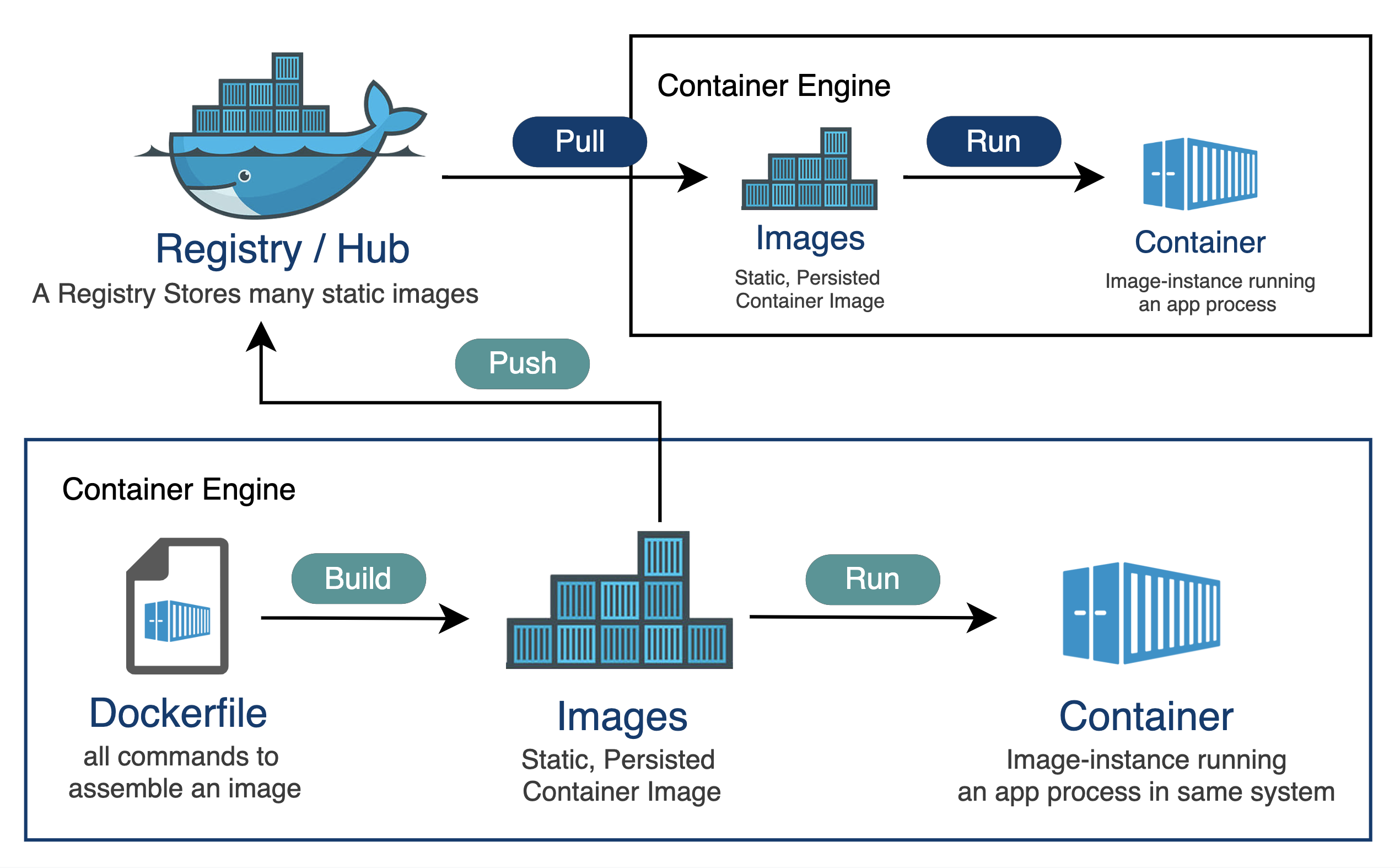
Core Concepts
- Dockerfile → Blueprint of the image
- Image → Immutable template
- Container → Running instance of an image
- Registry → Stores images (Docker Hub, private registry)
Example Dockerfile
# Base image
FROM node:18

# Set working directory
WORKDIR /app

# Copy dependency files
COPY package*.json ./

# Install dependencies
RUN npm install

# Copy rest of the code
COPY . .

# Expose application port
EXPOSE 3000

# Start application
CMD ["npm", "start"]
Build and run:
docker build -t my-app .
docker run -p 3000:3000 my-app
Now your app runs inside an isolated container.
Docker ensures consistency.
But it does not handle traffic spikes.
Production rarely runs one container.
You need multiple services.
That’s where Docker Compose comes in.
🧩 Docker Compose — Multi-Container Management
Docker Compose allows you to define and run multi-container applications using a single YAML file.
Example:
version: '3'
services:
  app:
    build: .
    ports:
      - "3000:3000"
    depends_on:
      - db

  db:
    image: postgres:14
    environment:
      POSTGRES_PASSWORD: example
Run everything:
docker-compose upThis creates:
- App container
- Database container
- Shared network
Great for development.
But it still runs on a single machine.
It doesn’t automatically scale.
Now let’s handle traffic.
⚖ Load Balancer — Controlling Incoming Traffic
What a Load Balancer Is
A load balancer distributes incoming network traffic across multiple backend instances to ensure:
- Reliability
- Availability
- Performance
Without it:
50,000 users → 1 container → crash.
With it:
50,000 users → Distributed across 10 containers → stable.
What Actually Happens When a Request Comes In
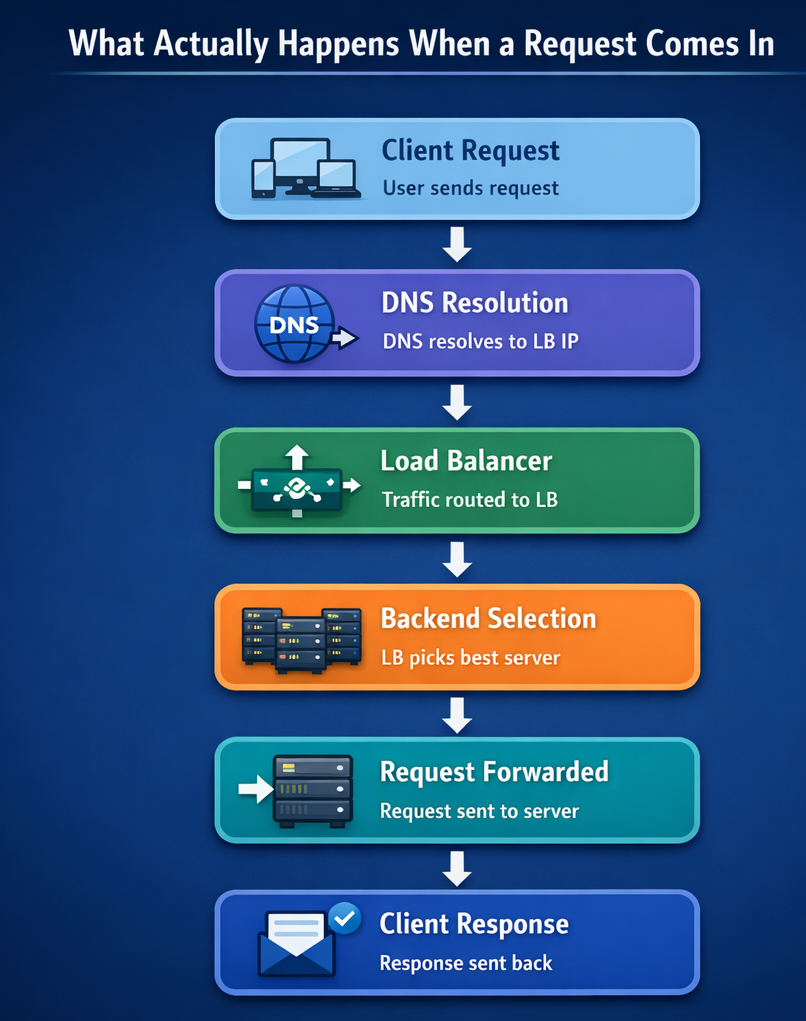
A load balancer also:
- Performs health checks
- Stops sending traffic to unhealthy instances
- Can terminate SSL
- Can apply rate limits
Load Balancing Algorithms (How Traffic Is Distributed)
This is where engineering decisions matter.
1️⃣ Round Robin
Requests are distributed sequentially:
A → B → C → A → B → C
Works well when servers have equal capacity.
2️⃣ Least Connections
Traffic goes to the server with the fewest active connections.
Better when request durations vary.
3️⃣ IP Hash
Client IP determines backend server.
Ensures session stickiness.
4️⃣ Weighted Round Robin
Servers with higher capacity get more traffic.
Useful when infrastructure is uneven.
5️⃣ Least Response Time
Traffic goes to the fastest responding instance.
Optimizes latency.
Load balancing improves distribution.
But it does not:
- Automatically create new containers
- Restart crashed ones
- Scale dynamically
- Manage deployments
For that, you need orchestration.
☸ Kubernetes — Orchestrating Containers at Scale
What Kubernetes Is
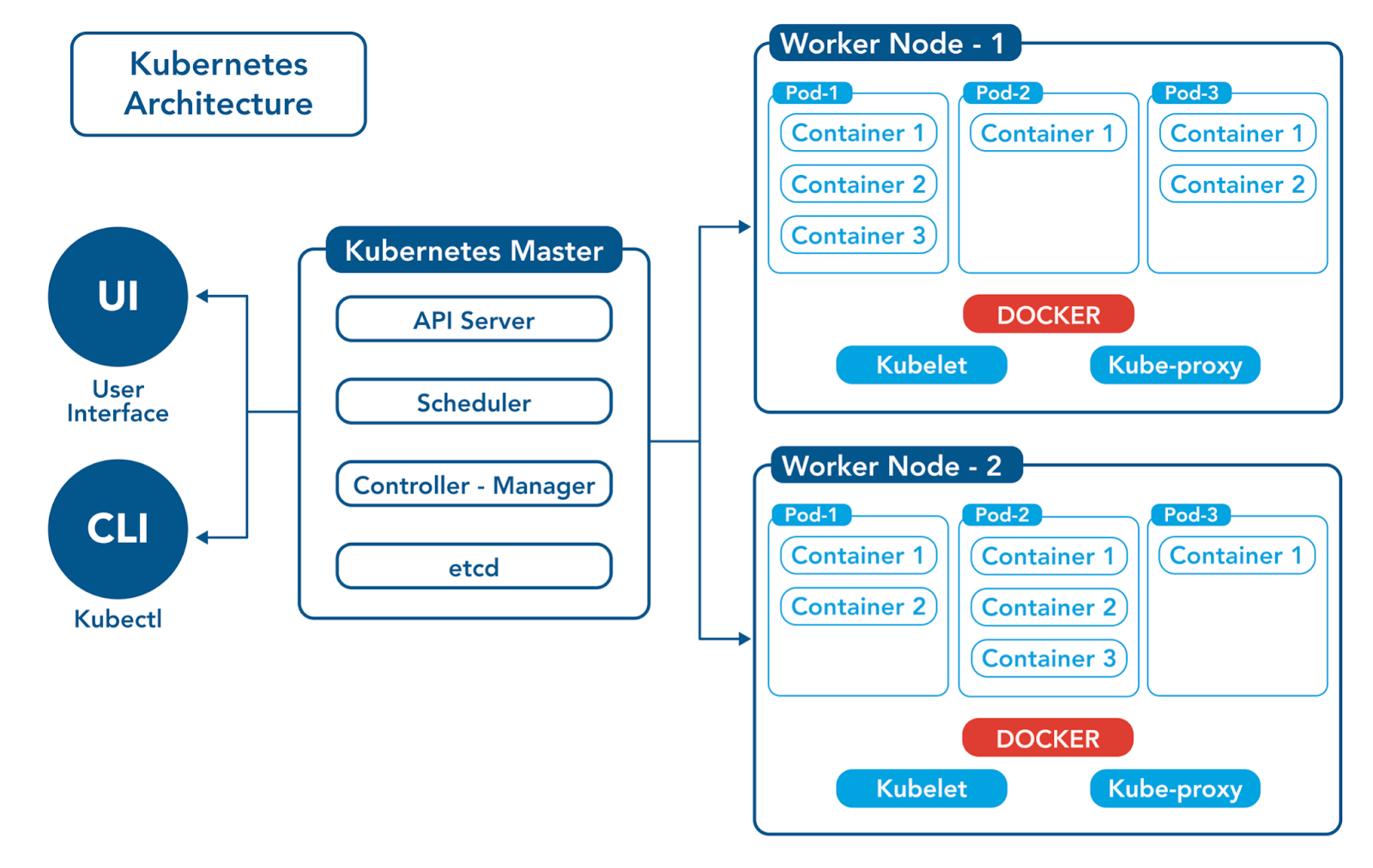
Kubernetes is a container orchestration platform that automates:
- Deployment
- Scaling
- Networking
- Lifecycle management
Across a cluster of machines.
It continuously manages infrastructure state.
What Kubernetes Actually Does
Core responsibilities:
- Maintains desired replica count
- Restarts crashed containers
- Auto-scales based on CPU/memory
- Performs rolling deployments
- Manages internal networking
- Provides service discovery
Instead of manually starting containers, you declare:
“I want 10 replicas.”
Kubernetes ensures that state.
If one fails → replace it.
If CPU spikes → scale out.
If traffic drops → scale in.
Docker vs Kubernetes — Understanding the Difference
Docker and Kubernetes do not compete.
They solve different layers of the problem.
Docker Solves:
- Application packaging
- Environment consistency
- Process isolation
- Lightweight runtime
It works perfectly for:
- Single server
- Small-scale systems
- Development environments
Kubernetes Solves:
- Multi-node orchestration
- Automated scaling
- Self-healing
- Rolling deployments
- Service abstraction
- Cluster networking
It operates across:
- Multiple machines
- Multiple availability zones
- Large production systems
Designing for Failure, Not Just Power
Production systems don’t survive traffic because of powerful servers.
They survive because responsibility is separated:
- Docker handles environment consistency
- Load balancers handle intelligent traffic distribution
- Kubernetes handles automation and resilience
When traffic jumps from 200 to 50,000 users:
- Containers multiply
- Traffic redistributes
- Failures isolate
- The system adapts
And users never know what almost broke.
Production systems don’t scale because they are powerful.
They scale because they are designed to fail safely.